Best Wall-Mount Laptop Solutions for a Clutter-Free Desk and Flexible Viewing
Choosing a wall-mounted laptop setup can free desk space, improve ergonomics, and support dual-use configurations for laptop and monitor setups. This guide reviews five top options that fit 12-17 inch notebooks and offer varying degrees of tilt, swivel, and extension. Each product highlights key installation methods, weight capacity, and mount versatility to help you pick the right solution for home offices, small apartments, or shared workspaces.
| Product | Brand | Key Benefit |
|---|---|---|
| UPGRAVITY Laptop Wall Mount | UPGRAVITY | Gas-spring lift with 2-in-1 laptop or monitor use |
| MOUNT PRO Laptop Arm Mount | MOUNT PRO | Full-motion, dual-function tray for laptop or monitor |
| HUANUO Laptop Desk Mount | HUANUO | Ventilated tray, easy switch between laptop and monitor |
| Mount-It! Ergonomic Laptop Arm | Mount-It! | Dual mounting, full motion, portable installation options |
| Putilsen 2-in-1 Laptop Wall Mount | Putilsen Mount | Detachable tray, full motion, 2.2-19.8 lbs range |
All products described support multiple installation angles, improved airflow, and organized cabling. Read on for a detailed comparison and practical buying guidance tailored to American workspaces.
UPGRAVITY 2-in-1 Gas Spring Wall Mount

The UPGRAVITY wall mount offers a 2-in-1 design that supports both laptops (12-17 inches, 3.3-17.6 lbs) and VESA-compatible monitors (13-32 inches) using 75×75 or 100×100 mm patterns. Its gas-spring mechanism enables forward extension up to 19.7 inches and a maximum height of 16.34 inches. The mount enables ±45° tilting, 180° swiveling, and 360° rotation for flexible ergonomics. Integrated cable management hides wires for a tidy workspace, while the swing-out feature frees up desk space when not in use.
WALI Laptop Tray Desk Mount

The WALI mount supports laptops up to 17 inches and up to 22 lbs, with detachable mount plates and adjustable height. It accommodates both laptop and monitor configurations thanks to 75×75 mm and 100×100 mm mounting holes. The unit offers multiple mounting options (C-clamp or grommet desk fit) and broad articulation: ±15° tilt, ±90° swivel, 360° rotation, and a flexible 16-inch height-adjustable pole. This makes it adaptable for varied desk setups and seating positions.
MOUNT PRO Laptop Arm Mount
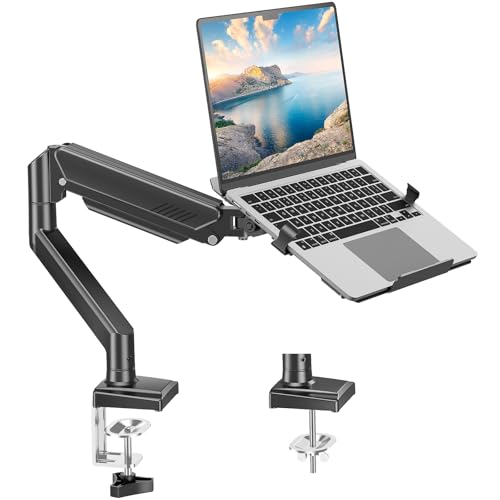
Universal and lightweight aluminum design fits 17-inch notebooks or 32-inch monitors with VESA 75x75mm and 100x100mm patterns, holding 4.4-22 lbs. It offers -45° to +90° tilt, 180° swivel, and 360° rotation, enabling ergonomic postures for typing, viewing, and collaboration. The tray is height-adjustable and designed to reduce clutter by supporting a clean, space-saving setup. Note the safety guidance: rotate the tray to a vertical position only when the monitor is installed and safe.
Putilsen 2-in-1 Wall Mount with Detachable Tray

The Putilsen Mount supports 12-17 inch notebooks or 17-32 inch monitors with an adjustable platform width from 276-472 mm and a load range of 2-9 kg (roughly 4.4-19.8 lbs). It features a full range of motion: left-right rotation of -90° to +90°, a 250 mm height adjustment, and a sturdy silicone-coated platform to prevent scratches. This solution doubles as a wall-mount monitor arm, providing ergonomic angles for comfortable viewing and easier posture management.
ELETIUO Wall & Under Desk Mount (Adhesive or Screws)

ELETIUO’s universal wall-and-under-desk mount supports devices up to 26 mm thick (1.02 inches) and offers dual mounting options: strong adhesive strips for quick, tool-free mounting or screw-on stability using included M4 screws and M6 anchors for heavier devices. Anti-scratch pads protect the device, and a cut-out design ensures full access to ports. This product emphasizes flexibility for temporary or permanent installations in offices, bedrooms, or kitchens.
Buying Guide: Key Purchase Considerations
When choosing a wall-mount system for a laptop or mixed-use laptop/monitor setup, consider these factors to optimize comfort, safety, and space savings:
- Weight and size compatibility: Verify the supported laptop size (12-17 inches) and weight range. Some models also support larger monitors via VESA patterns 75×75 or 100×100 mm.
- Motion and adjustability: Decide between full-motion arms (tilt, swivel, rotation) and fixed trays. Gas-spring or hydraulic supports can offer smoother height adjustments, while solid arms provide robust stability.
- Installation method: Choose between adhesive mounting for quick setup or screws/anchors for permanent, heavier installations. Consider whether you’ll relocate often or require a semi-permanent solution.
- airflow and cooling: A ventilated tray or access to open airflow reduces overheating risk on laptops during prolonged use.
- Cable management: Look for integrated channels or grommets to keep cords tidy and protected from snagging.
- Dual-use versatility: If you occasionally switch to a monitor, check VESA compatibility and whether the stand can revert to a monitor arm without sacrificing laptop stability.
- Desk compatibility: Ensure clamps or grommets fit your desk thickness and construction. Some mounts offer both mounting options for flexibility in different rooms.
- Safety features: Protective padding on contact points minimizes scratches, while locking mechanisms or secure fasteners reduce the risk of accidental detachment.
In practice, a gas-spring or full-motion wall mount is ideal for dynamic workstyles, enabling comfortable viewing angles while standing or sitting. For shared workspaces and renter-friendly setups, adhesive options paired with screws may provide a balance between temporary use and long-term stability. Always follow manufacturer installation guidelines and ensure the mounting surface can bear the combined weight of the laptop and tray.